SwiftUI Snippet: Custom ShapeStyles with Shaders
Since Shader
implements ShapeStyle, it can be used directly to fill or stroke a Shape.
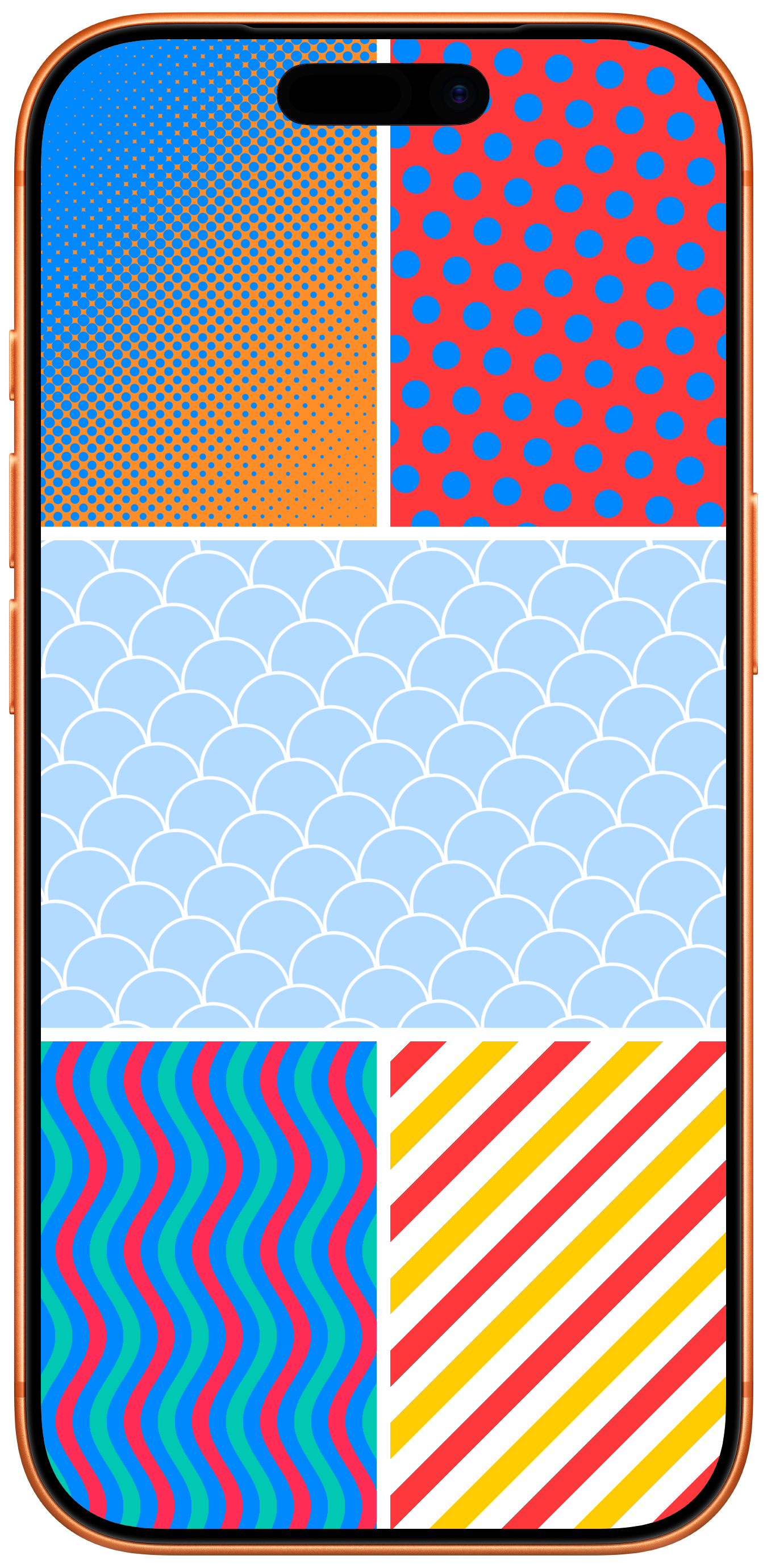
In this Snippet, I've experimented with how simple drawing operations can be composed to form more complicated patterns. Often, it's enough to modulate a single parameter – like the radius in the halfToneDots
pattern – to produce new and interesting results.
Pattern.swift
import SwiftUI

#Preview {
  Grid {
    GridRow {
      Rectangle()
        .fill(.halfToneDots(
          foregroundColor: .blue,
          backgroundColor: .orange,
          radius: 5,
          startPoint: .topLeading,
          endPoint: .bottomTrailing
        ))

      Rectangle()
        .fill(.polkaDots(
          foregroundColor: .blue,
          backgroundColor: .red,
          angle: .degrees(-7),
          patternSize: CGSize(width: 30, height: 50)
        ))
    }

    Rectangle()
      .fill(.fishScale(
        foregroundColor: .white,
        backgroundColor: .blue.opacity(0.3),
        radius: 26,
        thickness: 1.5,
        angle: .degrees(12)
      ))

    GridRow {
      Rectangle()
        .fill(.waves(
          colors: [.mint, .blue, .pink, .blue],
          angle: .degrees(90)
        ))

      Rectangle()
        .fill(.lines(
          colors: [.red, .white, .yellow, .white],
          width: 15,
          angle: .degrees(45)
        ))
    }
  }
  .edgesIgnoringSafeArea(.all)
}

struct HalfToneDots: @preconcurrency ShapeStyle {
  var foregroundColor: Color = .primary

  var backgroundColor: Color = .accentColor

  var radius: Double = 4

  var patternSize: CGSize? = nil

  var startPoint: UnitPoint = .leading

  var endPoint: UnitPoint = .trailing

  func resolve(in environment: EnvironmentValues) -> some ShapeStyle {
    let d = radius * 2
    let size = patternSize ?? CGSize(width: d, height: d);

    return ShaderLibrary.default.halfToneDots(
      .boundingRect,
      .float(radius),
      .float2(startPoint.x, startPoint.y),
      .float2(endPoint.x, endPoint.y),
      .float2(size),
      .color(foregroundColor),
      .color(backgroundColor)
    )
  }
}

extension ShapeStyle where Self == HalfToneDots {
  static func halfToneDots(foregroundColor: Color = .primary, backgroundColor: Color = .accentColor, radius: Double = 4, patternSize: CGSize? = nil, startPoint: UnitPoint = .leading, endPoint: UnitPoint = .trailing) -> Self {
    HalfToneDots(foregroundColor: foregroundColor, backgroundColor: backgroundColor, radius: radius, patternSize: patternSize, startPoint: startPoint, endPoint: endPoint)
  }
}

struct PolkaDots: @preconcurrency ShapeStyle {
  var foregroundColor: Color = .primary

  var backgroundColor: Color = .accentColor

  var radius: Double = 8

  var angle: Angle = .zero

  var offset: CGSize = .zero

  var patternSize: CGSize? = nil

  func resolve(in environment: EnvironmentValues) -> some ShapeStyle {
    let d = radius * 3 * sqrt(2)
    let size = patternSize ?? CGSize(width: d, height: d)

    return ShaderLibrary.default.polkaDots(
      .boundingRect,
      .float(radius),
      .float(angle.radians),
      .float2(offset),
      .float2(size),
      .color(foregroundColor),
      .color(backgroundColor)
    )
  }
}

extension ShapeStyle where Self == PolkaDots {
  static func polkaDots(foregroundColor: Color = .primary, backgroundColor: Color = .accentColor, radius: Double = 8, angle: Angle = .zero, offset: CGSize = .zero, patternSize: CGSize? = nil) -> Self {
    PolkaDots(foregroundColor: foregroundColor, backgroundColor: backgroundColor, radius: radius, angle: angle, offset: offset, patternSize: patternSize)
  }
}

struct FishScale: @preconcurrency ShapeStyle {
  var foregroundColor: Color = .primary

  var backgroundColor: Color = .accentColor

  var radius: Double = 20

  var thickness: Double = 2

  var angle: Angle = .zero

  var offset: CGSize = .zero

  func resolve(in environment: EnvironmentValues) -> some ShapeStyle {
    ShaderLibrary.default.fishScale(
      .boundingRect,
      .float(radius),
      .float(thickness),
      .float(angle.radians),
      .float2(offset),
      .color(foregroundColor),
      .color(backgroundColor)
    )
  }
}

extension ShapeStyle where Self == FishScale {
  static func fishScale(foregroundColor: Color = .primary, backgroundColor: Color = .accentColor, radius: Double = 20, thickness: Double = 2, angle: Angle = .zero, offset: CGSize = .zero) -> Self {
    FishScale(foregroundColor: foregroundColor, backgroundColor: backgroundColor, radius: radius, thickness: thickness, angle: angle, offset: offset)
  }
}

struct Lines: @preconcurrency ShapeStyle {
  var colors: [Color]

  var width: CGFloat = 10

  var angle: Angle = .zero

  var offset: CGSize = .zero

  func resolve(in environment: EnvironmentValues) -> some ShapeStyle {
    ShaderLibrary.default.lines(
      .boundingRect,
      .float(width),
      .float(angle.radians),
      .float2(offset),
      .colorArray(colors)
    )
  }
}

extension ShapeStyle where Self == Lines {
  static func lines(colors: [Color], width: CGFloat = 10, angle: Angle = .zero, offset: CGSize = .zero) -> Self {
    Lines(colors: colors, width: width, angle: angle, offset: offset)
  }
}

struct Waves: @preconcurrency ShapeStyle {
  var colors: [Color]

  var width: CGFloat = 10

  var angle: Angle = .zero

  var offset: CGSize = .zero

  var patternSize: CGSize? = nil

  func resolve(in environment: EnvironmentValues) -> some ShapeStyle {
    ShaderLibrary.default.waves(
      .boundingRect,
      .float(width),
      .float(angle.radians),
      .float2(offset),
      .float2(patternSize ?? CGSize(width: width * 10, height: 4 * width)),
      .colorArray(colors)
    )
  }
}

extension ShapeStyle where Self == Waves {
  static func waves(colors: [Color], width: CGFloat = 10, angle: Angle = .zero, offset: CGSize = .zero, patternSize: CGSize? = nil) -> Self {
    Waves(colors: colors, width: width, angle: angle, offset: offset, patternSize: patternSize)
  }
}
Pattern.metal
#include <metal_stdlib>

using namespace metal;

/// Calculates the Signed Distance Field of a circle.
///
/// Effectively, how far is the `position` from the perimeter of a circle at
/// `center` with a radius of `r`.
///
/// If the result is positive, `position` lies outside the circle.
/// If the result is zero, `position` lies on the permeter of the circle.
/// If the result is negative, `position` lies inside the circle.
///
/// SDFs are a powerful tool when drawing with shaders.
///
/// Inigo Quilez has written extensively on the topic, check out
/// https://iquilezles.org/articles/distfunctions2d/ for more formulas for 2D
/// shapes you can explore.
static float sdfCircle(float2 position, float2 center, float r) {
  return length(position - center) - r;
}

/// Wraps `position` within a box of `size`.
static float2 wrap(float2 position, float2 size) {
  return fmod(fmod(position, size) + size, size);
}

/// Rotates `position` around `(0, 0)` by angle (in radians).
static float2 rotate(float2 position, float angle) {
  float s = sin(angle);
  float c = cos(angle);

  return float2(c * position.x - s * position.y, s * position.x + c * position.y);
}

/// Returns a fill color based on the distance of an SDF.
static half4 fill(half4 c1, half4 c2, float distance) {
  if (distance <= 0) {
    return c1;
  } else if (distance <= 0.5) {
    // If we're within 0.5 px outside the SDF, quickly blend between `c1`
    // and `c2`
    return mix(c1, c2, 2 * fract(distance));
  } else {
    return c2;
  }
}

/// Calculates a repeating pattern of dots of two colors.
///
/// The pattern consists of five dots, on at each corner of a box of `size` with
/// one additional dot in the center.
static half4 dotPattern(float2 position, float radius, float2 size, half4 c1, half4 c2) {
  // Wrap position within `size.
  position = wrap(position, size);

  // Place a dot at every corner, then calcate the SDF.
  float d1 = sdfCircle(position, size * float2(0.0, 0.0), radius);
  float d2 = sdfCircle(position, size * float2(1.0, 0.0), radius);
  float d3 = sdfCircle(position, size * float2(0.0, 1.0), radius);
  float d4 = sdfCircle(position, size * float2(1.0, 1.0), radius);
  float d5 = sdfCircle(position, size * float2(0.5, 0.5), radius);

  // The minimum of all five distances is the distance to the closes point.
  //
  // You can think of this as forming a union of the five circles.
  float d = min(d1, min(d2, min(d3, min(d4, d5))));

  return fill(c1, c2, d);
}

/// A simple polka dot pattern.
[[ stitchable ]] half4 polkaDots(float2 position, float4 bounds, float radius, float angle, float2 offset, float2 size, half4 c1, half4 c2) {
  // Center the pattern around the center of `bounds`.
  // This makes resizing a shape filled with this pattern less busy.
  position -= bounds.zw / 2;

  // Offset the pattern and rotate it if necessary.
  position += offset;
  position = rotate(position, angle);

  return dotPattern(position, radius, size, c1, c2);
}

/// A half-tone dot pattern.
[[ stitchable ]] half4 halfToneDots(float2 position, float4 bounds, float radius, float2 start, float2 end, float2 size, half4 c1, half4 c2) {
  // Convert `position` to unit coordinates.
  float2 uv = position / bounds.zw;

  // Calculate how far `uv` is along the linear gradient from `start` to
  // `end`.
  float2 a = uv - end;
  float2 b = start - end;

  float fraction = dot(a, b) / dot(b, b);

  // Modulate the radius by the progress of the gradient, resulting in the
  // half-tone pattern.
  return dotPattern(position, radius * fraction, size, c1, c2);
}

/// A pattern of alternating stripes.
[[ stitchable ]] half4 lines(float2 position, float4 bounds, float thickness, float angle, float2 offset, device const half4 *ptr, int count) {
  // Calculate the total width of the pattern.
  float totalWidth = float(count) * thickness;

  // Center & rotate. Compensate for `totalWidth`.
  position -= bounds.zw / 2;
  position += offset;
  position += totalWidth / 2;
  position = rotate(position, angle);

  position = wrap(position, float2(totalWidth));

  int i = int(floor(position.y / thickness));

  return ptr[i % count];
}

/// A pattern of alternating waves.
///
/// You could also express `lines` through `waves` with an amplitude of 0.
[[ stitchable ]] half4 waves(float2 position, float4 bounds, float thickness, float angle, float2 offset, float2 size, device const half4 *ptr, int count) {
  float totalWidth = float(count) * thickness;

  // Center & rotate. Compensate for `totalWidth`.
  position -= bounds.zw / 2;
  position += offset;
  position += totalWidth / 2;
  position = rotate(position, angle);

  // Apply a cosine function scaled to fit within `size`.
  position.y += (size.y / 2 - thickness) * cos((position.x / size.x) * 2 * M_PI_F);

  position = wrap(position, float2(totalWidth));

  int i = int(floor(position.y / thickness));

  return ptr[i % count];
}

/// A fish-scale pattern.
[[ stitchable ]] half4 fishScale(float2 position, float4 bounds, float r, float thickness, float angle, float2 offset, half4 c1, half4 c2) {
  // Center & rotate.
  position -= bounds.zw / 2;
  position += offset;
  position = rotate(position, angle);

  // Split the image in rows of height `radius`. Every row is shifted by one
  // radius to the right based on its distance to the center.
  position.x += 1 * r * floor(position.y / r);

  // Wrap position with (2 * r, r).
  position = wrap(position, float2(2 * r, r));

  float d = sdfCircle(position, float2(1 * r,  r), r - thickness / 2);

  // To form a ring, we need to form the absolute of distance, then subtract
  // the thickness.
  d  = abs(d);
  d -= thickness / 2;

  return fill(c1, c2, d);
}
I've only used a single circular Signed Distance Field here to keep things simple but I'd definitely encourage to try plugging in your own. Inigo Quilzes has written about SDFs at length and they've been an incredibly versatile tool for me. You may also enjoy this recent article by Antoine Mayerowitz.
Another observation here is that since ShapeStyle
does not vend any API that would allow us to rotate or offset a pattern, we end up duplicating a lot of that functionality across the different shader functions. Here's hoping we might see something like
Rectangle()
.fill(someShapeStyle.rotate(.degrees(20)))
Thank you for your continuing support everyone!
Robb