SwiftUI Snippet: Curtain Effect
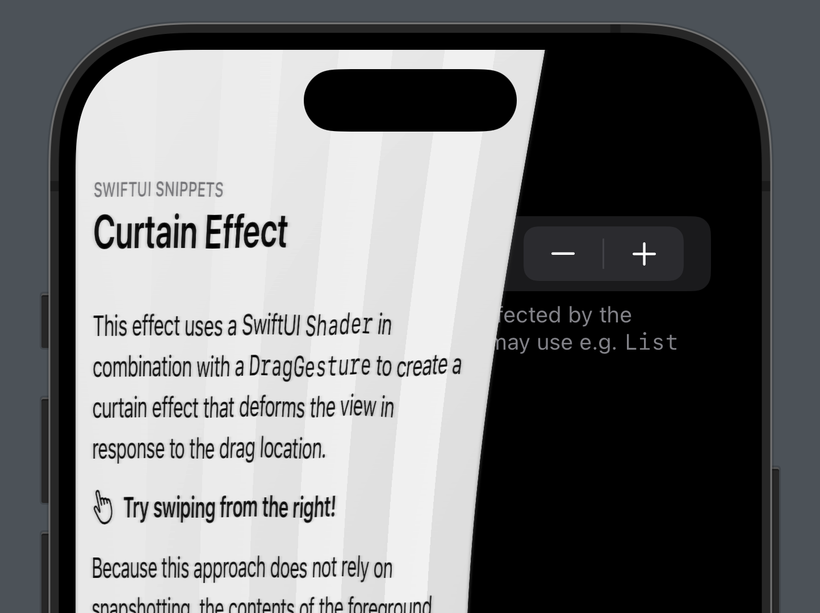
An interactive Curtain Effect built with SwiftUI Shaders
I think this effect highlights the opportunities SwiftUI Shaders offer as well as the limitations we still have to deal with when using them.
Most importantly, the way they interact with UIKit-backed Views prevents Lists or ScrollViews from appearing on the top layer, but I think you could still use this effect for individual swipe actions or an onboarding flow.
Curtain.swift
import SwiftUI

struct CurtainStack<Foreground: View, Background: View>: View, Animatable {
  /// The position of the current drag operation, or `nil`.
  @State private var dragPosition: CGPoint?

  /// `true` if the bottom layer is revealed.
  @State private var isRevealed: Bool = false

  var foreground: Foreground

  var background: Background

  /// The number of folds the curtain has.
  var folds: Int

  init(folds: Int = 4, @ViewBuilder foreground: () -> Foreground, @ViewBuilder background: () -> Background) {
    self.folds = folds
    self.foreground = foreground()
    self.background = background()
  }

  var body: some View {
    GeometryReader { p in
      let maxX = p.size.width

      // A simple drag gesture.
      //
      // We want to track the the drag in the coorindate of this view,
      // not the view we will end up installing it on, thus requiring us
      // to reference an explicity coordinate space.
      let drag = DragGesture(minimumDistance: 0, coordinateSpace: .named("curtain"))
        .onChanged { v in
          withAnimation(.interactiveSpring) {
            var position = v.location
            position.x = rubberClamp(44, position.x, 1_000_000)

            dragPosition = position
          }
        }
        .onEnded { v in
          if v.predictedEndLocation.x < 100 {
            isRevealed = true

            withAnimation {
              dragPosition?.x = 44
            }
          } else {
            isRevealed = false

            withAnimation {
              dragPosition?.x = maxX
            }
          }
        }

      ZStack {
        background
          .safeAreaPadding(EdgeInsets(top: 0, leading: 44, bottom: 0, trailing: 0))

        foreground
          .modifier(CurtainEffect(
            foldCount: folds,
            dragPosition: dragPosition ?? CGPoint(x: maxX, y: 0),
            maxX: maxX
          ))
          .allowsHitTesting(!isRevealed)
          .accessibilityHidden(isRevealed)
          .shadow(radius: isRevealed ? 10 : 0)
      }
      .overlay(alignment: isRevealed ? .leading : .trailing) {
        // We install the `DragGesture` on an invisible rect on the edge
        // of the view. This makes sure the swipe can only be started
        // here.
        Color.clear
          .contentShape(Rectangle())
          .frame(width: 44)
          .gesture(drag)
      }
      .coordinateSpace(.named("curtain"))
    }
  }
}

struct CurtainEffect: ViewModifier, Animatable {
  var animatableData: AnimatablePair<CGFloat, CGFloat> {
    get {
      AnimatableData(dragPosition.x, dragPosition.y)
    }
    set {
      dragPosition.x = newValue.first
      dragPosition.y = newValue.second
    }
  }

  /// The location of the drag in the coordinate space of `content`.
  var dragPosition: CGPoint

  var maxX: CGFloat

  var foldCount: Int

  /// See Curtain.metal
  let shaderFunction = ShaderFunction(library: .default, name: "curtain")

  init(foldCount: Int = 4, dragPosition: CGPoint, maxX: CGFloat) {
    self.foldCount = foldCount
    self.dragPosition = dragPosition
    self.maxX = maxX
  }

  func body(content: Content) -> some View {
    let shader = Shader(function: shaderFunction, arguments: [
      .boundingRect,
      .float2(max(20, animatableData.first), animatableData.second),
      .float(Float(foldCount))
    ])

    let isEnabled = dragPosition.x != maxX

    content

      .visualEffect { content, geometryProxy in
        content
          .layerEffect(
            shader,
            maxSampleOffset: CGSize(width: geometryProxy.size.width, height: 20),
            isEnabled: isEnabled
          )
      }
  }
}

#Preview {
  CurtainExample()
}

struct CurtainExample: View {
  enum Foreground: String {
    case text
    case grid
  }

  @State
  var foldCount: Int = 4

  @State
  var foreground: Foreground = .text

  @State
  var date = Date.now

  var body: some View {
    CurtainStack(folds: foldCount) {
      VStack(alignment: .leading, spacing: 12) {
        VStack(alignment: .leading) {
          Text("SwiftUI Snippets").font(.caption.weight(.medium))
            .textCase(.uppercase).tracking(0.2)
            .foregroundStyle(.secondary)

          Text("Curtain Effect").font(.title.weight(.semibold))
            .padding(.bottom)
        }

        Text("""
        This effect uses a SwiftUI `Shader` in combination with a `DragGesture` to create a curtain effect that deforms the view in response to the drag location.
        """)

        HStack(alignment: .firstTextBaseline) {
          Image(systemName: "hand.point.up.left").imageScale(.large)

          Text("Try swiping from the right!")
            .fontWeight(.semibold)
        }

        Text("Because this approach does not rely on snapshotting, the contents of the foreground layer remain live.")

        Text("For example, this timer continues to update: ") + Text(date, style: .timer)

        Text("However, some caveats still apply:")

        Text("Views backed by UIKit will not display correctly on the top layer, this includes `List` but also `ProgressView`. Instead, the will render like this:")

        ProgressView()

        Text("More importantly, `ScrollView` also doesn't seem to work, limiting how much content you can fit on the screen.")

        Spacer()
      }
      .font(.body.leading(.loose))
      .padding()
      .frame(maxWidth: .infinity, alignment: .leading)
      .background(Color(white: 0.96))
      .colorScheme(.light)
    } background: {
      List {
        Section {
          Stepper("Number of Folds (\(foldCount))", value: $foldCount, in: 1 ... 8)
        } header: {
          Text("Settings")
        } footer: {
          Text("The backdrop view is not affected by the `Shaders`'s limitations and may use e.g. `List` freely.")
        }
      }
      .colorScheme(.dark)
    }
  }
}

private func clamp(_ min: CGFloat, _ value: CGFloat, _ max: CGFloat) -> CGFloat {
  Swift.max(min, Swift.min(value, max))
}

private func rubberClamp(_ min: CGFloat, _ value: CGFloat, _ max: CGFloat, coefficient: CGFloat = 0.55) -> CGFloat {
  let clamped = clamp(min, value, max)

  let delta = abs(clamped - value)

  guard delta != 0 else {
    return value
  }

  let sign: CGFloat = clamped > value ? -1 : 1

  let range = (max - min)

  return clamped + sign * (1.0 - (1.0 / ((delta * coefficient / range) + 1.0))) * range
}

extension Shader.Argument {
  static func float2(_ unitPoint: UnitPoint) -> Self {
    self.float2(unitPoint.x, unitPoint.y)
  }
}
Curtain.metal
#include <metal_stdlib>
#include <SwiftUI/SwiftUI.h>

using namespace metal;

[[ stitchable ]] half4 curtain(float2 position, SwiftUI::Layer layer, float4 bounds, float2 dragPosition, float foldCount) {
  // The `position` expressed in unit coordinates [0,1].
  float2 uv = position / bounds.zw;

  // The `dragPosition` expressed in unit coordinates [0,1].
  float2 dragUV = dragPosition / bounds.zw;

  // Reveals every row of pixels unformly.
  //
  // 0: The curtain is fully closed.
  // 1: The curtain is fully open.
  //
  // This matches the distance of the drag location to the left edge and thus
  // the location of the user's finger.
  float uniformReveal = saturate(1 - dragUV.x);

  // Abort early if the curtain if fully open.
  if (uniformReveal == 1) return 0;

  // Reveals every row of pixels based on its distance to the drag.
  //
  // We scale `uniformReveal` by multiplying with a Gaussian function that is
  // fed the vertical distance of the current row of pixels to the drag.
  //
  // This results in the row under the finger still being compressed by
  // `revealAmount`, lining up with the users finger.
  //
  // Meanwhile, rows further away "decompress" smoothly, giving the final edge
  // a smooth, bell-curve-like shape.
  //
  // The denominator 0.45 controls how "pointy" the curve is and was determined
  // through trial and error.
  float2 distance = uv - dragUV;
  float localReveal = uniformReveal * exp(-pow(distance.y, 2) / 0.45);

  // For the final compression value, blend between the uniform and local
  // values with a bias towards `curve`.
  //
  // This will make sure that when `uniformReveal` is `1`, `localReveal` will
  // no longer have an effect.
  float compression = mix(localReveal, uniformReveal,  saturate(pow(uniformReveal + 0.15, 1.8)));

  // Scale `uv` horizontally based on `compression`.
  //
  // When the current row of pixels is 0% revealed, `compression` will be 0
  // and thus `uv` will be scaled by `float2(1, 1)`.
  //
  // When the current row of pixels is 50% revealed, `compression` will be 0.5
  // and thus `uv` will be scaled by `float2(2, 1)`.
  //
  // This is the new location at which we will sample `layer`.
  float2 distortedUV = uv * float2(1 / (1 - compression), 1);

  // To create the illusion of the surface of the curtain folding, we need to
  // perform two additional steps.
  //
  // - Move the sample position vertically to create a depth effect as the
  //   material's distance to the camera changes.
  // - Tweak the sampled color to create the illusion of light hitting the
  //   folds.
  //
  // To do this, we model the surface of the scaled material using a wave-like
  // function and calculate its derivative.

  // The period of the waves, `1 / p` is the number of folds we'll see.
  float p = 1.0 / foldCount;

  // We don't want the folds evenly distributed across the surface, so we bias
  // them towards the right edge.
  float biasedX = pow(distortedUV.x, 1.2);

  // Scale factor for the lighting and vertical displacement.
  float foldAmount = distortedUV.x * -(cos(compression * M_PI_F) - 1) / 2;

  // A triangle function that models creases in the curtain and its
  // derivative.
  //
  // See https://en.wikipedia.org/wiki/Triangle_wave
  float fold  = 2 * abs(biasedX / p - floor(biasedX / p + 0.5));
  float foldD = sign(sin(2 * M_PI_F * biasedX / p));

  // Displace the y coorindate of the sample location, scaled by the distance
  // to the vertical center of the layer.
  distortedUV.y += foldAmount * fold * (-12 / bounds.w) * (2 * uv.y - 1);

  // The light we're adding or subtracting.
  half4 highlight = 0;

  if (distortedUV.x < 1) {
    highlight += foldAmount * foldD * half4(half3(0.1), 0);
    highlight -= compression * half4(half3(0.1), 0);
  }

  // The new sample position in the coordinate space of `layer`.
  float2 s = distortedUV * bounds.zw;

  // If the surface of the curtain contains high-frequency content such as
  // text, we'll see shimmering artifacts when it gets compressed too tightly.
  //
  // Since `layer` does not seem to support mipmaps, we perform a
  // one-dimensional Gassian blur to use as a low pass filter, then blend
  // between the "crisp" original `color` value and the `blurred` value based
  // on the amount of compression.

  // The sampling offsets of the blur.
  const float offset[5] = {0.0, 1.0, 2.0, 3.0, 4.0};
  // The weights of the blur.
  const float weight[5] = {0.2270270270, 0.1945945946, 0.1216216216, 0.0540540541, 0.0162162162};

  half4 color = layer.sample(s);
  half4 blurred = color * weight[0];

  // Perform the blur.
  for (int i = 1; i < 5; i++) {
    blurred += layer.sample(s + float2(1, 0) * offset[i]) * weight[i];
    blurred += layer.sample(s - float2(1, 0) * offset[i]) * weight[i];
  }

  // Mix, then add highlight.
  return mix(color, blurred, 1.1 * pow(compression, 1.4)) + highlight;
}